
Eligibility is checked before the patient arrives.
Revenue Sphere uses RPA to work with any practice management system. It verifies eligibility for every scheduled visit and tracks claim status with the payers you bill most, so providers can spend their time on patient care instead of managing billing staff, and your practice can run billing with a smaller team.
- Works with any PMS
- Automatic eligibility checks
- Live claim status
- Lower billing staff cost
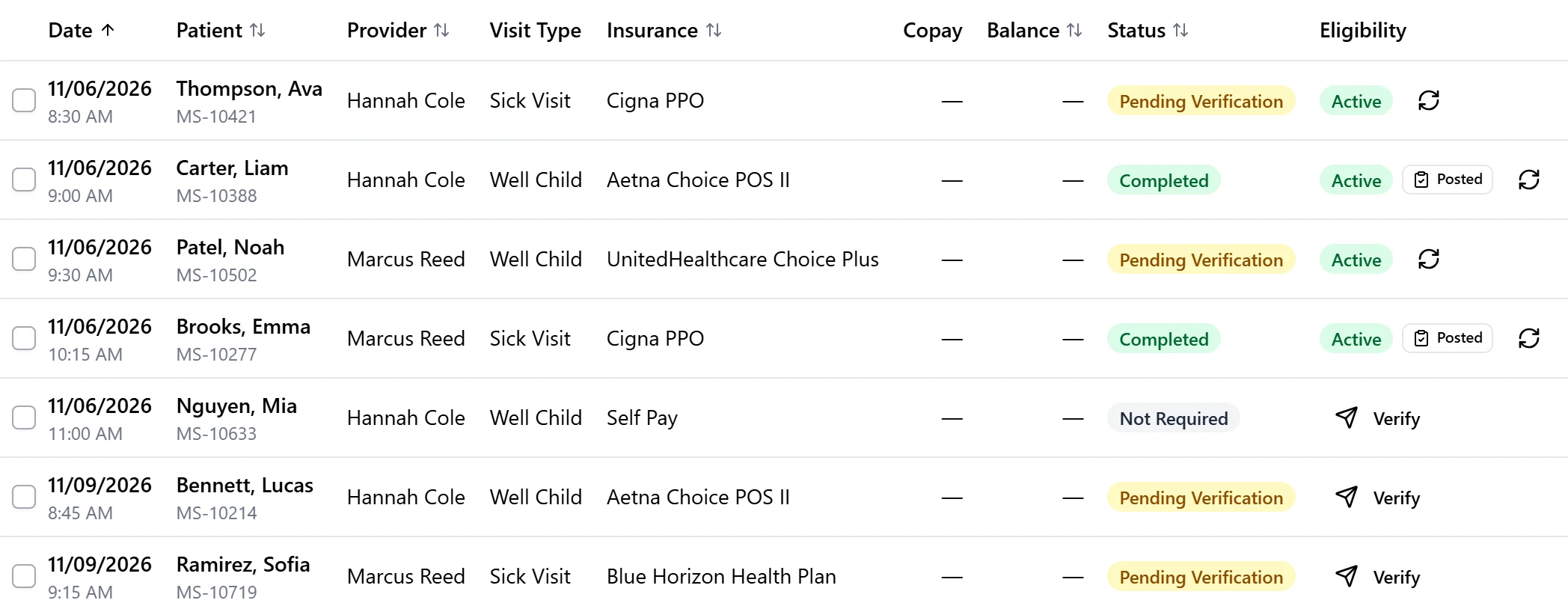
Your day, already checked.
Every morning the schedule is verified for you. This is the worklist your team sees.
More time for patients. Less spent on billing staff.
Eligibility checks and claim follow-up are repetitive work that usually needs several people. Revenue Sphere does that work automatically, so providers no longer have to hire, train and supervise extra billing staff to keep up.
Providers focus on patient care
Fewer staffing decisions, fewer billing escalations and fewer interruptions. Your clinical time goes to patients, not to managing a billing team.
Lower cost for billing staff
Routine portal checks are handled by automation, so you need fewer billing hours to cover the same volume and can avoid new hires as you grow.
Your team works on exceptions
Staff you keep spend their day on denials and coverage problems that need a person, which is where they protect the most revenue.
A bot does the portal work your team has no time for.
No system replacement and no new data entry. Revenue Sphere works alongside the software your practice already uses.
- 1STEP 1
Connect your PMS
An RPA bot signs in to your practice management system like a staff member would and reads the upcoming schedule.
- 2STEP 2
Verify eligibility
Each patient's coverage is checked with the payer, without anyone opening a portal.
- 3STEP 3
Track claims
Submitted claims are checked with the payer on a schedule, and every status change is recorded.
- 4STEP 4
Act on exceptions
Your team sees only inactive coverage, denials and stalled claims, and works those first.
Built to protect collections at the front and back of the cycle.
Works with any practice management system
If your staff can use it in a browser or desktop app, an RPA bot can too. There is no API to wait for and no vendor integration project.
- Cloud PMS
- Desktop PMS
- EHR with billing
- Legacy systems
- Custom software
Automatic eligibility checks
Front desks rarely have time to verify every visit. Revenue Sphere does it for the whole schedule.
- Coverage confirmed before the visit
- Inactive plans flagged early
- Results recorded for each patient
Claim status from major payers
Stop logging in to payer sites one by one. See every open claim in a single list.
- Paid, in process and denied at a glance
- Aging claims surfaced for follow-up
- Fewer calls to payer help desks
Connected to the payers most practices bill every day.
- UnitedHealthcare
- Aetna
- Cigna
- Anthem BCBS
- Humana
- Medicare
- Medicaid
- and more on request
Payer names belong to their owners and are listed to show compatibility only.
Patient data stays protected.
-
Secure connection
TLS 1.2+ encrypted in transit -
AES-256 encryption
PHI protected at rest -
HIPAA ready
Built for healthcare compliance
Spend your time on patients, not on billing staff.
See eligibility and claim status run on your own schedule and your own PMS. Tell us how to reach you and we will set up a walkthrough.
Talk to our team
Tell us about your schedule, your PMS and the payers you bill, and we will set up a call about what the bot can take off your staff's plate.
See a live demo
Watch eligibility checks and claim status run against a sample schedule, and see the exceptions list your team would work each day.
Already a client?
Sign in to see today's eligibility results, open claims and the exceptions waiting for your team.
Sign in to Revenue Sphere